M. Avatar Setting
M. Avatar Setting is an editor extension for configuring the VRChat avatar Menno directly in Unity. It covers launch methods and automated setup.
Required Tools
Please install the following tools first.
Launching
You can open it using either of the following methods.
From the Menu
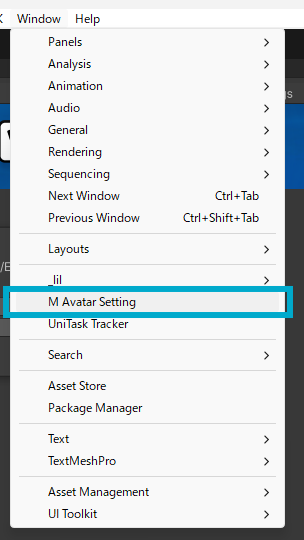
- In the Unity menu, select
Window > M Avatar Setting.
From the M. Avatar Setup Helper
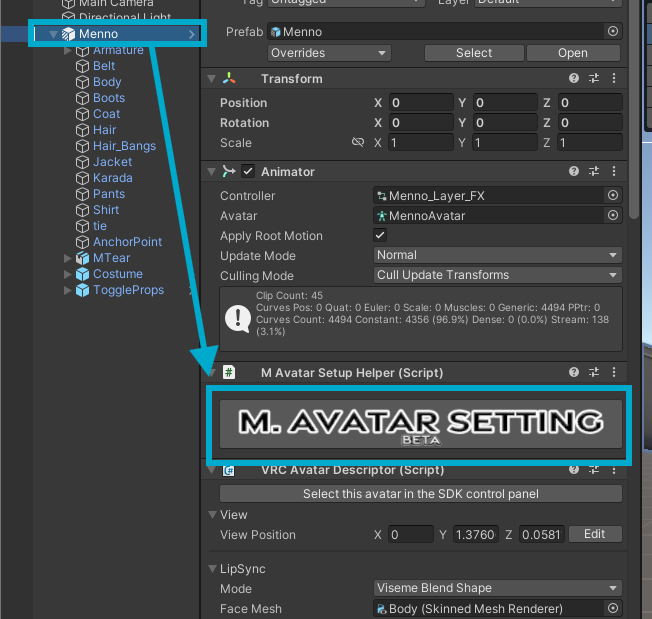
- Select the avatar in the Hierarchy.
- Press the "Open M. Avatar Setting" button on the "M. Avatar Setup Helper" component in the Inspector.
The window will open while the avatar is selected.
Adding Animation Keys
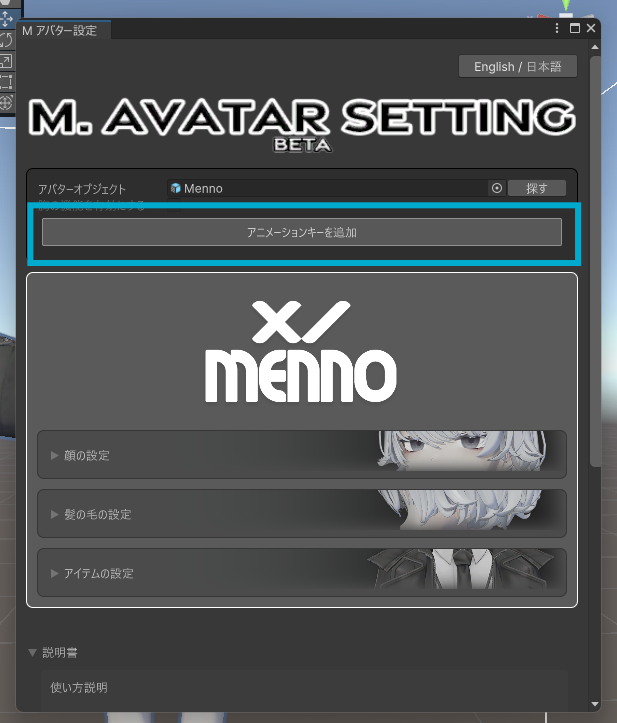
Automatically registers the _LightMinLimit value (lower bound for brightness) across all materials in the avatar, which is used by the "Lighting Adjustment" Radial Puppet in the Expression Menu.
- Open the M. Avatar Setting window.
- Select an avatar.
- Press the "Add Animation Keys" button.
Note
This is not yet supported for components that modify hierarchy in Modular Avatar (future support planned).
Further Reading
The available settings vary depending on the avatar.