Item Settings
Configure the usage, initial visibility, and color of costumes and toggle items that can be equipped or unequipped in VRChat.
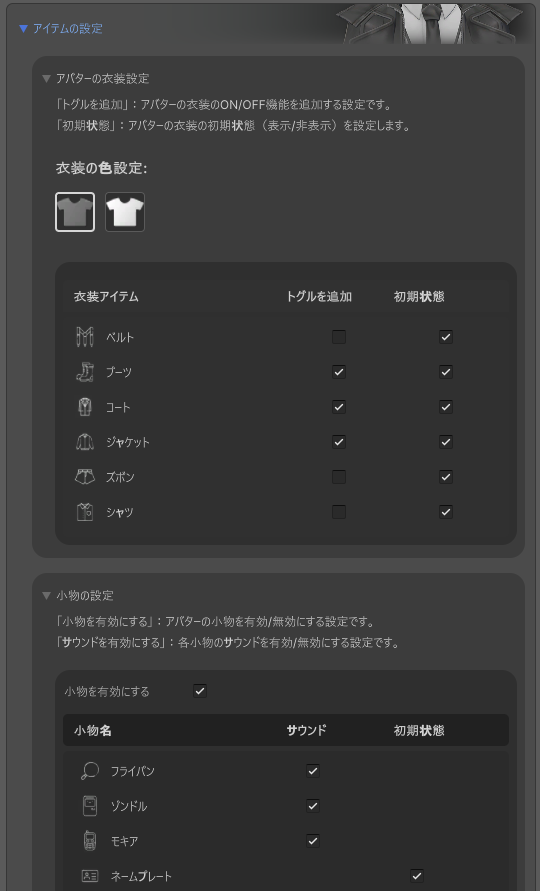
How to Use
- Open the M. Avatar Setting window
- Select the Menno avatar
- Expand the "Costume Settings" section
- Check the box next to the desired costume
Costumes
| Item | Description |
|---|---|
| Checkbox | Enable this costume |
| Initial State | Displayed from avatar load time when enabled. Can be enabled for multiple costumes at once |
| Color Button | Standard color / White. Changes the color of all costumes at once |
Toggle Items
Applies to the following three items: Pan (frying pan), Xondle, and Mokia (mobile phone).
| Item | Description |
|---|---|
| Enable/Disable | Whether to use the item |
| Sound Effect | Play a sound effect when toggling |
| Initial State | Display upon avatar load |
Item names and descriptions switch according to the language toggle button (Japanese/English) in the top-right corner of the window.
Reset
Press the "Reset" button and confirm with "Yes" to revert all costume and toggle item settings to their initial state.
Source Files
| Target | Location |
|---|---|
| Costume Prefabs | Assets/emudotto/Menno/Animation/ModularAvatar/Costume |
| Toggle Item Prefab | Assets/emudotto/Menno/Prefab/ToggleProps.prefab |
| Costume Materials | Assets/emudotto/Menno/Materials/Menno_Wear.mat |