Face Shape Key Presets (Detailed Guide)
Learn how the buttons work, how values are calculated when stacking presets, where they are saved, and how to troubleshoot issues. Basic steps are in the Quick Start.
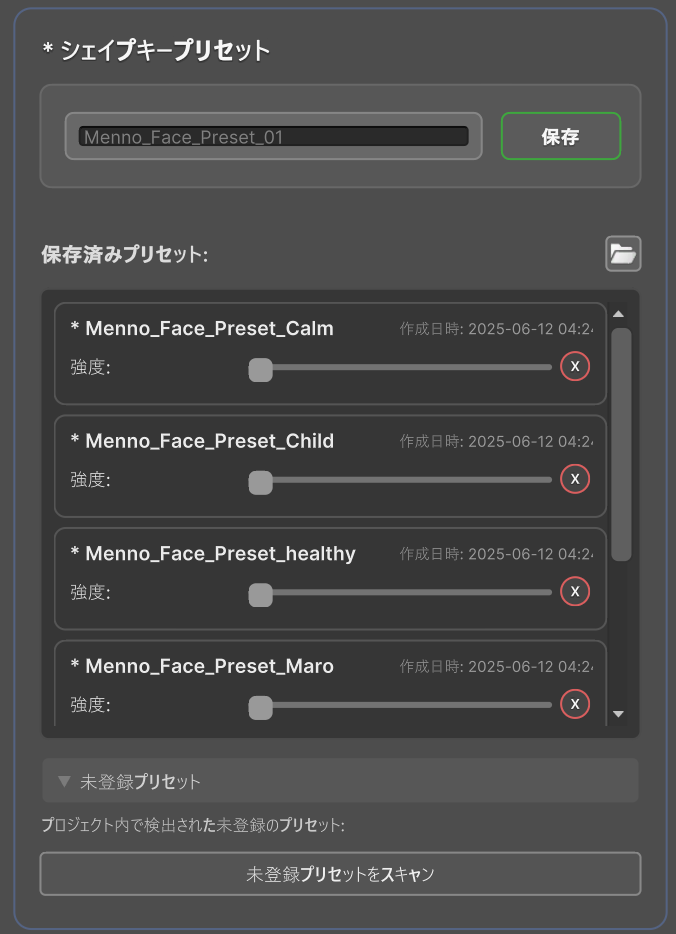
Interface Items
| Item | Function |
|---|---|
| "Save" button | Saves the current blendshape configuration with the entered name |
| "Strength" slider | Applies the preset at 0–100% intensity. Changes reflect on the face immediately |
| Folder button (next to "Saved Presets:") | Opens the save folder in the project window |
| "X" button | Deletes the preset after confirmation |
How Presets Are Applied
- Applying a preset does not completely overwrite the current configuration; its effect can be adjusted with intensity.
- When multiple presets are applied simultaneously, their values are added (e.g., smile 0.5 + 0.3 = 0.8).
- Values never exceed 1.0 (e.g., 0.7 + 0.6 results in 1.0, not 1.3).
- Later-applied presets take priority. Presets with 0% intensity are ignored.
- Real-time manual adjustments always take priority.
Saved Files
Presets are saved as .asset files in the following folder. Contents include the preset name, values for each blendshape (0.0–1.0), and the creation timestamp.
Assets/emudotto/Menno/Resources/Face_Presets/Presets are saved per project and persist across Unity restarts.
Using in Other Projects
Preset files can be copied to other projects for use. When selling or distributing them, follow the rules in the Distribution Guide.
Exporting
- Open the
Face_Presetsfolder in the Project window. - Select the preset files you want to share.
- Right-click and select "Export Package".
Importing
- Drag and drop the received files into the project.
- Place the files in the
Face_Presetsfolder. If exported from aFace_Presetsfolder, they will be placed here automatically. - Reopen the M. Avatar Setting window.
Troubleshooting
| Symptom | Cause | Solution |
|---|---|---|
| Fails to save | Missing file write permissions | Check permissions for the Unity project folder |
| Fails to apply | Blendshape name was changed | Recreate the preset or manually edit the .asset file |
| Intensity has no effect | Another script is controlling the blendshapes | Disable conflicting scripts or adjust execution order |