Face Blend Shape Presets (Quick Start)
Save your adjusted face shape as a preset and call it up anytime with the slider. For details on each button and where presets are stored, see the Detailed Guide.
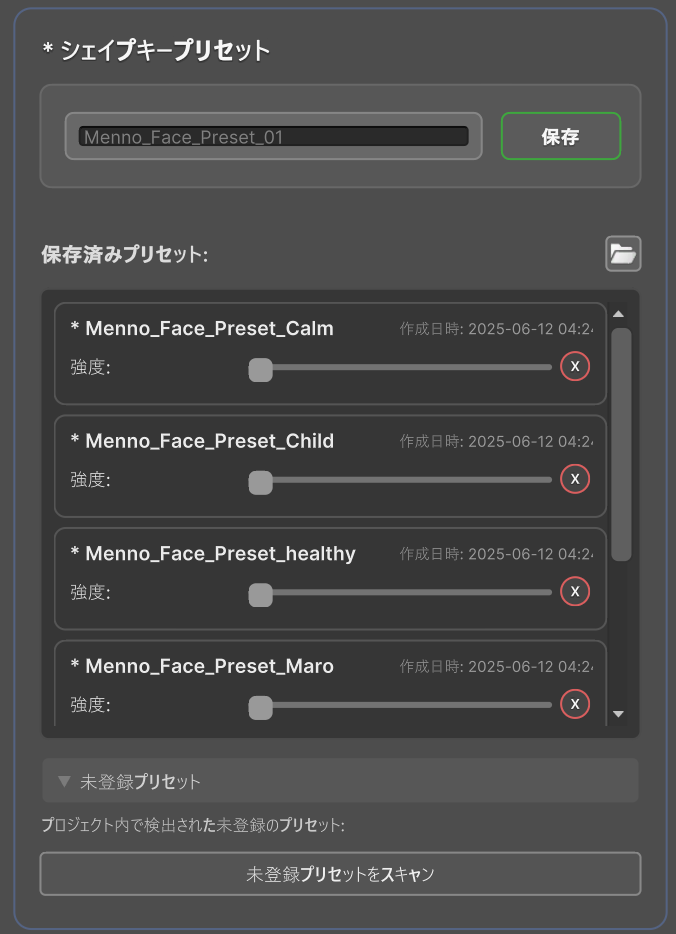
Save a Preset
- Adjust the blend shape to your desired face shape in Face Settings.
- Enter a preset name in the "Shape Key Preset" section. The default name is something like
Menno_Face_Preset_01. You can change it to a clear name like "Child", "Adult", or "Baby Face". - Click the "Save" button.
Apply a Preset
- Find the preset you want to use in the "Saved Presets" list.
- Move the "Strength" slider for that preset. The face will change instantly.
| Strength | Result |
|---|---|
| 0% | Not applied |
| 50% | Applied at half strength |
| 100% | Fully applied |
You can blend faces by raising the strength of multiple presets at once (e.g., "Child" at 50%, "Adult" at 30%).